article.tgz holds this article plus all the scripts, templates, CSS stuff, etc.
I've been using Firefox as a file-browser for years. The default file display provided by Apache is OK, but it's not great.
I tried some tweaks but they weren't much of an improvement, and I had a specific itch to scratch: rapidly searching or reading dated files like firewall- or system-logs.
For example, I rotate my system logs at midnight by creating hard-links from /var/log files to files under a dated directory. On 15 Apr, the tree looked like this:
FILETREE                    HARDLINKED TO
/var
+--log
|   +--2026
|   |   +--0415
|   |   |   +--cron         /var/log/cron
|   |   |   +--daemon       /var/log/daemon
|   |   |   +--debug.log    ...
|   |   |   +--local0log
|   |   |   +--local1log
|   |   |   +--local2log
|   |   |   +--local3log
|   |   |   +--local4log
|   |   |   +--local5log
|   |   |   +--local6log
|   |   |   +--local7log
|   |   |   +--maillog
|   |   |   +--ntplog
|   |   |   +--secure
|   |   |   +--syslog       /var/log/syslog
I want a calendar on the right half of the screen. Clicking 4/15/2026 gives me something like this on the left half, where the filenames are URLs pointing to the associated files:
561422 15-Apr-2026 23:59:57 cron
   101 15-Apr-2026 00:01:00 daemon
    37 15-Apr-2026 00:00:01 debug.log
    37 15-Apr-2026 00:00:01 local0log
    37 15-Apr-2026 00:00:01 local1log
    37 15-Apr-2026 00:00:01 local2log
    37 15-Apr-2026 00:00:01 local3log
    37 15-Apr-2026 00:00:01 local4log
    37 15-Apr-2026 00:00:01 local5log
285736 15-Apr-2026 23:36:18 local6log
   194 15-Apr-2026 00:02:00 local7log
  4663 15-Apr-2026 05:38:37 maillog
   140 15-Apr-2026 06:22:28 ntplog
    37 15-Apr-2026 00:00:01 secure
 41485 15-Apr-2026 23:59:57 syslog
Permissions, etc. are dealt with elsewhere.
My httpd.conf:
# DirectoryIndex: sets the file that Apache will serve if a directory
# is requested.  Basics first...
<IfModule dir_module>
    DirectoryIndex index.htm index.html index.xml index.txt
</IfModule>

# ...then append index.php to DirectoryIndex...
<IfDefine php_module.c>
    <FilesMatch \.php$>
        SetHandler application/x-httpd-php
    </FilesMatch>

    AddType application/x-httpd-php .php
    AddType application/x-httpd-php-source .phps
    <IfModule dir_module>
        DirectoryIndex index.php
    </IfModule>
</IfDefine>

# ...and finally append autoindex -- must come last.
# Sat, 14 Nov 2020 03:53:51 -0500
#   Disable if you want to autogenerate fancy indexes.

<IfModule dir_module>
    DirectoryIndex /cgi-bin/autoindex
</IfModule>
Dealing with dates is a PITA, but web access takes it to an entirely new level:
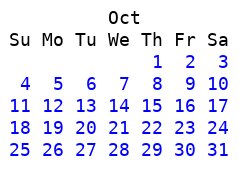
cal does everything I need for a readable month. All I had to do was add URLs for each day. cal output for Oct 2015 looks like this:
    October 2015
 Su Mo Tu We Th Fr Sa
              1  2  3
  4  5  6  7  8  9 10
 11 12 13 14 15 16 17
 18 19 20 21 22 23 24
 25 26 27 28 29 30 31
mon2pre reads cal output and writes a table.
cal 10 2015 | mon2pre | tidy > sample-oct.htm
The tidied-up HTML looks like this. I frequently use days as folders, so the CSS "class=e" is for an empty day, and "class=m" is for a date that should be marked as (say) containing files.
<!DOCTYPE html>
<!-- Generator: mon2pre -->
<html>
  <head>
    <title>October 2015</title>
    <style>
    a         { text-decoration: none; }
    a:link    { color: blue; }
    a:visited { color: red; }
    a:hover   { background-color: black; color: white; }
    </style>
  </head>
  <body>
    <pre>
          Oct
 Su Mo Tu We Th Fr Sa
            <a class="e"
     href="TOP/2015/1001">  1</a><a class="e"
     href="TOP/2015/1002">  2</a><a class="e"
     href="TOP/2015/1003">  3</a>
<a class="e"
     href="TOP/2015/1004">  4</a><a class="e"
     href="TOP/2015/1005">  5</a><a class="e"
     href="TOP/2015/1006">  6</a><a class="e"
     href="TOP/2015/1007">  7</a><a class="e"
     href="TOP/2015/1008">  8</a><a class="e"
     href="TOP/2015/1009">  9</a><a class="e"
     href="TOP/2015/1010"> 10</a>
<a class="e"
     href="TOP/2015/1011"> 11</a><a class="e"
     href="TOP/2015/1012"> 12</a><a class="e"
     href="TOP/2015/1013"> 13</a><a class="e"
     href="TOP/2015/1014"> 14</a><a class="e"
     href="TOP/2015/1015"> 15</a><a class="e"
     href="TOP/2015/1016"> 16</a><a class="e"
     href="TOP/2015/1017"> 17</a>
<a class="e"
     href="TOP/2015/1018"> 18</a><a class="e"
     href="TOP/2015/1019"> 19</a><a class="e"
     href="TOP/2015/1020"> 20</a><a class="e"
     href="TOP/2015/1021"> 21</a><a class="e"
     href="TOP/2015/1022"> 22</a><a class="e"
     href="TOP/2015/1023"> 23</a><a class="e"
     href="TOP/2015/1024"> 24</a>
<a class="e"
     href="TOP/2015/1025"> 25</a><a class="e"
     href="TOP/2015/1026"> 26</a><a class="e"
     href="TOP/2015/1027"> 27</a><a class="e"
     href="TOP/2015/1028"> 28</a><a class="e"
     href="TOP/2015/1029"> 29</a><a class="e"
     href="TOP/2015/1030"> 30</a><a class="e"
     href="TOP/2015/1031"> 31</a>

</pre>
  </body>
</html>
oct.htm has the HTML, and oct.jpg has a screenshot. The script has an option -b (body only) in case I want to use the output as part of a larger page that already has CSS and a container for multiple months.
It's intended to be a template; replace "TOP" with the top-level directory you want to display.
mkmonths runs mon2pre for several years. I stopped at 2038 since that's going to be our next Unix clean-up-the-code year:
#!/bin/ksh
# generate plain/html calendars

export PATH=/usr/local/bin:/bin:/usr/bin

for year in $(seq 1990 2038); do
    for mon in $(seq -w 1 12); do
        echo ${year}-${mon}
        cal $mon $year | ./mon2pre -b > templates/${year}/${mon}.tpl
    done
done
Unless someone redoes the Gregorian calendar, these templates should do the trick. The templates directory for 2025 looks like this:
autoindex
+--templates
|   +--2025
|   |   +--01.tpl
|   |   +--02.tpl
|   |   +--03.tpl
|   |   +--04.tpl
|   |   +--05.tpl
|   |   +--06.tpl
|   |   +--07.tpl
|   |   +--08.tpl
|   |   +--09.tpl
|   |   +--10.tpl
|   |   +--11.tpl
|   |   +--12.tpl
|   +--2025.htm
|   +--2025.tpl
The January 2025 template (01.tpl) is the calendar body contained within the <pre> tags:
          Jan
 Su Mo Tu We Th Fr Sa
         <a class="e"
     href="TOP/2025/0101">  1</a><a class="e"
     href="TOP/2025/0102">  2</a><a class="e"
     href="TOP/2025/0103">  3</a><a class="e"
     href="TOP/2025/0104">  4</a>
<a class="e"
     href="TOP/2025/0105">  5</a><a class="e"
     href="TOP/2025/0106">  6</a><a class="e"
     href="TOP/2025/0107">  7</a><a class="e"
     href="TOP/2025/0108">  8</a><a class="e"
     href="TOP/2025/0109">  9</a><a class="e"
     href="TOP/2025/0110"> 10</a><a class="e"
     href="TOP/2025/0111"> 11</a>
<a class="e"
     href="TOP/2025/0112"> 12</a><a class="e"
     href="TOP/2025/0113"> 13</a><a class="e"
     href="TOP/2025/0114"> 14</a><a class="e"
     href="TOP/2025/0115"> 15</a><a class="e"
     href="TOP/2025/0116"> 16</a><a class="e"
     href="TOP/2025/0117"> 17</a><a class="e"
     href="TOP/2025/0118"> 18</a>
<a class="e"
     href="TOP/2025/0119"> 19</a><a class="e"
     href="TOP/2025/0120"> 20</a><a class="e"
     href="TOP/2025/0121"> 21</a><a class="e"
     href="TOP/2025/0122"> 22</a><a class="e"
     href="TOP/2025/0123"> 23</a><a class="e"
     href="TOP/2025/0124"> 24</a><a class="e"
     href="TOP/2025/0125"> 25</a>
<a class="e"
     href="TOP/2025/0126"> 26</a><a class="e"
     href="TOP/2025/0127"> 27</a><a class="e"
     href="TOP/2025/0128"> 28</a><a class="e"
     href="TOP/2025/0129"> 29</a><a class="e"
     href="TOP/2025/0130"> 30</a><a class="e"
     href="TOP/2025/0131"> 31</a>
I needed a quick way to include month tables in a certain order, and a shell script plus M4 is about as easy as it gets. The 2025.tpl file holds M4 commands to create a 4-row/3-col calendar for 2025, with TOP replaced by /home/notebook:
define(`TOP',`/home/notebook')dnl
sinclude(`header')dnl
<table><thead><tr><th></th><th>2025</th><th></th></tr></thead><tbody>
<!-- row 1/4 -->
<tr>
<td valign="top"><pre class="calendar">sinclude(`2025/01.tpl')</pre></td>
<td valign="top"><pre class="calendar">sinclude(`2025/02.tpl')</pre></td>
<td valign="top"><pre class="calendar">sinclude(`2025/03.tpl')</pre></td>
</tr>
<!-- row 2/4 -->
<tr>
<td valign="top"><pre class="calendar">sinclude(`2025/04.tpl')</pre></td>
<td valign="top"><pre class="calendar">sinclude(`2025/05.tpl')</pre></td>
<td valign="top"><pre class="calendar">sinclude(`2025/06.tpl')</pre></td>
</tr>
<!-- row 3/4 -->
<tr>
<td valign="top"><pre class="calendar">sinclude(`2025/07.tpl')</pre></td>
<td valign="top"><pre class="calendar">sinclude(`2025/08.tpl')</pre></td>
<td valign="top"><pre class="calendar">sinclude(`2025/09.tpl')</pre></td>
</tr>
<!-- row 4/4 -->
<tr>
<td valign="top"><pre class="calendar">sinclude(`2025/10.tpl')</pre></td>
<td valign="top"><pre class="calendar">sinclude(`2025/11.tpl')</pre></td>
<td valign="top"><pre class="calendar">sinclude(`2025/12.tpl')</pre></td>
</tr>
</tbody></table>
sinclude(`footer')dnl
The header and footer include files hold everything else needed to create a page table.
This covers the right side of the screen, leaving the left side free for displaying directories and files.
I wanted something like a basic Apache file list with directories first, some whitespace, and then plain files (ignoring dotfiles and other cruft). It should include filetype icons plus basic metadata like filesize and modification time.
A CGI script can handle this without excessive overhead, since I'm using pre-generated date templates for everything except the file list. I have old machines and I'm not patient; when my response time gets annoying, I'll trade up to whatever the cool kids are using.
One caveat: NO Java or Javascript. I consider those tools of Satan.
This is a top-level driver that finds the type and location of the directory we're displaying. It's different for (say) a syslog or firewall-log directory vs. my home directory. It looks for a file called .autoindex holding one line -- the script that does the real work of listing files on one side and a calendar on the other.
This is where the real work happens. It's a perl CGI script which uses the DOCUMENT_ROOT and REQUEST_URI environment variables to figure out what directory you want to display and where it actually resides on the filesystem. Here are the relevant environment variables when viewing the URL /home/notebook/2026/0417/:
 DOCUMENT_ROOT = /doc/html/htdocs
REQUEST_METHOD = GET
REQUEST_SCHEME = http
   REQUEST_URI = /home/notebook/2026/0417/
My DOCUMENT_ROOT has a symbolic link to my home directory, so I can append REQUEST_URI to DOCUMENT_ROOT and get a legitimate top-level directory for the directory I want to display. The file $HOME/notebook/2026/0417/hiding-datacenter-emissions will be shown on the page as /home/notebook/2026/0417/hiding-datacenter-emissions.
Basic idea:
cd to today's directory from $REQUEST_URI and open it
Find any subdirectories
Find any other files that aren't directories
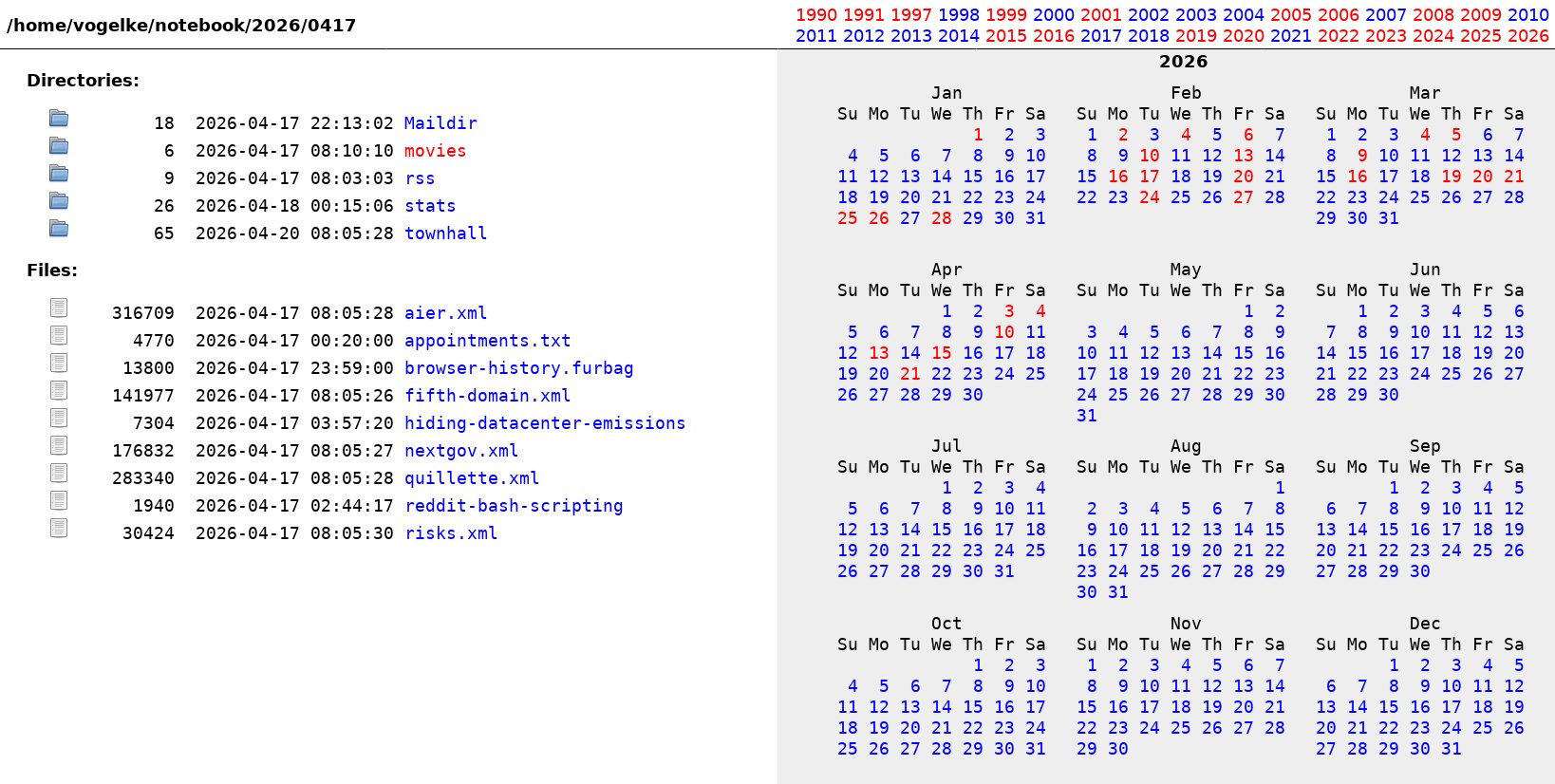
The screen looks like this, with icons shown in square brackets:
Directories:

  [DIR]        18  2026-04-17 22:13:02 Maildir
  [DIR]         6  2026-04-17 08:10:10 movies
  [DIR]         9  2026-04-17 08:03:03 rss
  [DIR]        26  2026-04-18 00:15:06 stats
  [DIR]        65  2026-04-20 08:05:28 townhall

Files:

  [TXT]    316709  2026-04-17 08:05:28 aier.xml
  [TXT]      4770  2026-04-17 00:20:00 appointments.txt
  [TXT]     13800  2026-04-17 23:59:00 browser-history.furbag
  [TXT]    141977  2026-04-17 08:05:26 fifth-domain.xml
  [TXT]      7304  2026-04-17 03:57:20 hiding-datacenter-emissions
  [TXT]    176832  2026-04-17 08:05:27 nextgov.xml
  [TXT]    283340  2026-04-17 08:05:28 quillette.xml
  [TXT]      1940  2026-04-17 02:44:17 reddit-bash-scripting
  [TXT]     30424  2026-04-17 08:05:30 risks.xml
Here's a screenshot.
You can see a list of directories at the top of the calendar display on the right. I didn't see a good reason to regenerate something on the fly that rarely if ever changes, so dirindex looks for those directories in the file $HOME/notebook/.dirlist:
<a href="/home/notebook/1990/0101">1990</a>
<a href="/home/notebook/1991/0101">1991</a>
...
<a href="/home/notebook/2009/0101">2009</a>
<a href="/home/notebook/2010/0101">2010</a><br>
<a href="/home/notebook/2011/0101">2011</a>
...
<a href="/home/notebook/2025/0101">2025</a>
<a href="/home/notebook/2026/0101">2026</a>
I've included a reasonable set of icons in the ficons directory (expected to be under DOCUMENT_ROOT) which are assigned to files based on the extension:
'.[1-9]' => 'file-man.png',
'.aiff'  => 'file-sound.png',
'.doc'   => 'x-office-document.png',
'.exe'   => 'application-x-executable.png',
...
'.wav'   => 'file-sound.png',
'.wmv'   => 'video-x-generic.png',
'.xhtml' => 'text-html.png',
I generate as much content as possible in advance, so the CGI script runs quickly. Yearly calendars are copied from the templates directory to my notebook directory:
+--home
|   +--vogelke
|   |   +--notebook
|   |   |   +--2000
|   |   |   |   +--.calendar     <==  copy of templates/2000.htm
|   |   |   +--2001
|   |   |   |   +--.calendar     <==  copy of templates/2001.htm
...
|   |   |   +--2025
|   |   |   |   +--.calendar     <==  copy of templates/2025.htm
|   |   |   +--2026
|   |   |   |   +--.calendar     <==  copy of templates/2026.htm
...
Here's a complete sample page showing the calendar for 4 May 2026.
I derived this from an article by Matthew James Taylor: https://matthewjamestaylor.com/2-column-layouts
His articles are excellent if you want responsive multi-column pages that work.
Feel free to send comments.
Generated from article.t2t by
txt2tags
$Revision: 1.8 $
$Date: 2026-05-05 01:16:21-04 $
$UUID: 1b845f31-a658-4a5d-a871-9aa9573b52cd $